

Today this blog will share with you about how to solve the controller not working by yourself.
You will know methods to check ambient lighting controller box applied to universal kit and specific kits(not including for Mercedes OEM kit).
When you are confusing of ambient lighting not working, it maybe the controller box problem. When you firstly make sure that all cables connections are correct, only to find the controller lighting is abnormal or even not lighting up. There are some different circumstances listed as following:
Notes: DON'T DO OTA UPGRADE WITHOUT OUR GUIDANCE OTHERWISE THE BOX WILL BE DAMAGED.
Main Controller Box Works Normally
The lighting inside the box is blinking fast, which indicates the controller box is working well. Therefore, the box is not faculty and you don’t need to make any settings.
Main Controller Box Works for a While or Not Working
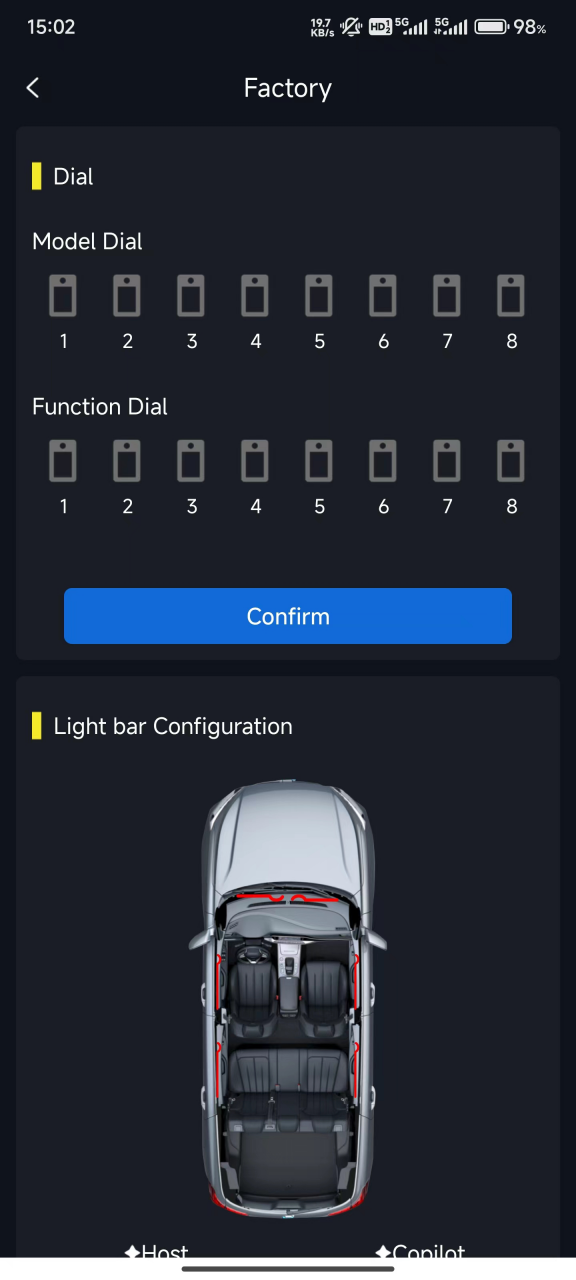
The controller lighting blinks 3 times only, then it stops blinking.You will need to check dial number in app factory setting. Specific car types using different CAN so the controller box is needed to be set before you start to use it. Here’s a dialing list that you can check: Special ambient light control box model list. Once you know the dialing number, you will go VOYEEGO ambient lighting control APP “Ambientlight” to do the setting. Make sure the ambient lighting kit’s Bluetooth gets connected. Here’s the step-by-step introduction: go setting-About-Factory setting-Input Password 1688-Model dial number according to the list-Click ok to save.
Main Controller Lighting Blinks Slowly
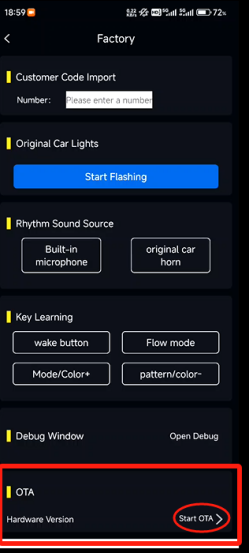
The lighting inside the box blinks but flashes slowly, it means the software is needed to be updated. You can do OTA upgrade in app setting. Firstly, do the same steps of connected ambience led kit’s Bluetooth in the APP. Secondly, go setting-about-factory setting-input password 1688-OTA-hardware version-start OTA.
Main Controller Lighting Blinks but show no version in the mobile app
After app device is connected with the Bluethooth, If the mobile app doesn't show version same as the picture attached below, need to do the activation of the controller box. The page is at Setting-factory setting(password:1688).

You need to prepare a TF card must below 16GB like this:

Download the software and put the file to the TF card: https://cdn.shopify.com/s/files/1/0796/1074/1019/files/atw_fwd_update_v60.bin?v=1770378808
Method to activate:
1) Find a TF card with a capacity less than 16G and copy the file to the TF card(The file name needs to have the parentheses and numbers removed.)
2) Insert the TF card into the main control box, then power the control box and wait for about 5-10 seconds.
3) When the indicator light in the main control box changes from solid to flashing, it means the upgrade is successful and you can remove the TF card.
Follow the Video: https://www.youtube.com/watch?v=WpCCY24nORc
Four Sub-controllers Not Lighting At All
If the main controller box is working right and four sub-controller boxes lighting doesn’t work, it means that four boxes are not connected with the main one. You should do matching in the setting after making sure there’s right wiring and gets powered. Method to match: Go APP “Ambientlight”-Setting-About-Factory setting-Input 1688 password- Function dial number 1-Click ok. It’s similar to main controller not working, please notice the only difference is that this is function dial not model dial.
Above all are frequently asked questions on ambient lights controller box. You will fix the problems you meet easily by yourself following these solutions. You can also contact VOYEEGO team for professional guidance for some other circumstances not mentioned here today.
2 comments
Hi TRENTON PARK, please contact our sales support team to get guidance.
I bought and installed the 2025 Honda Civic light kit and the results I’m getting are. The main control box light indicator remains lit when the car starts. No blinking at all. As for the interior lights they turn on after I connect the box to my phone with the app however the all of the lights turn off including the main controller indicator light.